Plan Mode vs. Thinking Budget: What I Learned from Claude Code in Action
The Course That Changed My Perspective
I just finished the official “Claude Code in Action” course from Anthropic, and honestly? It humbled me a bit. I consider myself a heavy Claude Code user, but I discovered something fundamental I’d been getting wrong: plan mode and thinking budget aren’t the same thing.
Before taking the course, I treated them as basically interchangeable. Hard problem coming up? I’d throw plan mode at it, maybe add “deep thinking” or “ultra thinking” for good measure. I didn’t really understand what made each one useful on its own—I just used both and hoped for the best.
The Core Distinction
Here’s what I learned: plan mode and thinking budget do completely different things.
Plan Mode: Research Before Action
Plan mode is about making a plan instead of taking immediate action. When you activate it, the agent will:
- Check everything in your codebase
- Make a detailed plan before doing anything
- Give you a chance to review and modify
- Wait for your approval before executing
This saves you from wasting tokens on actions you don’t want, or worse, heading in the wrong direction entirely. The agent does the homework first.
Thinking Budget: Deeper Reasoning, No Plan
“Ultra thinking” or “deep thinking” keywords make the agent think longer before acting. But here’s the key difference: they don’t write a plan. Instead, the agent applies deeper reasoning internally, thinking more carefully about the specific problem before acting.
It’s like the agent is processing more deeply in its head rather than producing a document for you to review.
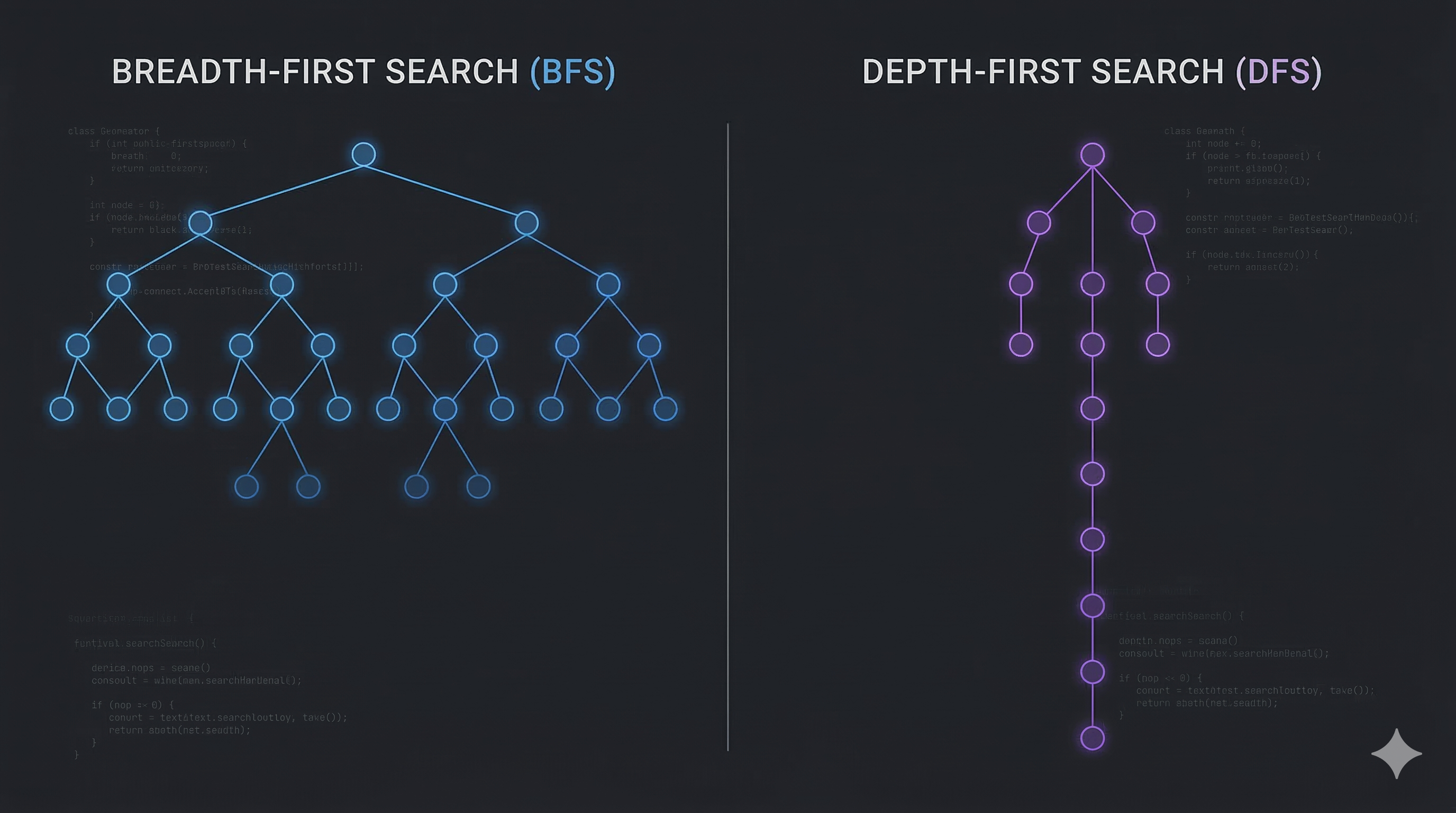
The BFS/DFS Analogy
Once I understood this, I came up with a mental model that helped:
- Plan mode is like BFS (Breadth-First Search): It searches widely, exploring different parts of the codebase, considering multiple approaches, creating a comprehensive roadmap.
- Thinking budget is like DFS (Depth-First Search): It goes deep into a specific problem, focusing intensely on the details rather than exploring broadly.
They’re both search strategies, but with completely different scopes and goals.
When to Use Each
The course made it clear that combining them by default is wasteful. Here’s when to use each:
Use Thinking Budget When:
- Debugging specific issues: You have a bug and you know roughly where it is. You want the agent to think deeply about that specific section, analyzing it carefully rather than searching broadly.
- Focused problem-solving: The scope is narrow and well-defined, and you need deeper reasoning rather than broader exploration.
Use Plan Mode When:
- Building big features: You want a comprehensive plan without getting bogged down in implementation details too early.
- Exploring unfamiliar code: You need to understand the landscape before diving deep.
- Architectural decisions: You want to consider multiple approaches and their tradeoffs.
The Cost of Combining Them
Sure, combining plan mode with thinking budget can be powerful—you get both broad exploration and deep reasoning. But it’s expensive:
- High token consumption: Both use substantial thinking tokens
- Slower execution: The agent takes much longer to respond
- Often unnecessary: Many tasks don’t need both
I realized I’d been overusing this combination simply because I didn’t understand that they served different purposes.
A Practical Example
Let’s say I’m working on my blog:
Scenario 1 - Debugging a rendering issue: I’d use thinking budget. The agent will focus deeply on the specific component that’s broken, thinking carefully about the problem without needing to explore the entire codebase.
Scenario 2 - Adding a new commenting system: I’d use plan mode. The agent will research how my blog is structured, explore different implementation approaches, and create a detailed plan for me to review.
Scenario 3 - Migrating to a new framework: Here, I might combine both. I need broad exploration of the codebase (plan mode) AND deep reasoning about the migration strategy (thinking budget). Yes, it’s expensive, but for a task this critical, it’s worth it.
Why This Matters for Efficiency
Understanding this distinction has made me more efficient:
- Token savings: I no longer waste thinking budget on tasks that just need good planning
- Time savings: I don’t wait for deep thinking when broad exploration would suffice
- Better results: I use the right tool for the job instead of throwing everything at it
The Course Recommendation
I recommend the “Claude Code in Action” course from Anthropic. It might seem beginner-facing, but as a heavy user, I still learned a lot. The course does an excellent job of clarifying these fundamental concepts that even experienced users might misunderstand.
Sometimes we get so used to using tools that we never stop to question whether we’re using them optimally. This course forced me to revisit my assumptions, and I’m glad it did.
The Bigger Picture
This experience reminded me of something important: understanding the “why” behind features is just as important as knowing “how” to use them.
I knew how to activate plan mode. I knew how to trigger thinking budget. But I didn’t truly understand what each one was optimized for. Now that I do, I can make better decisions about when to use which, and when combining them actually makes sense.
Moving Forward
Going forward, I’ll be more intentional about:
- Using plan mode for broad exploration and planning
- Using thinking budget for focused, deep problem-solving
- Combining them only when both breadth and depth are truly necessary
- Considering the token and time costs before defaulting to both
This small shift in understanding has already made my interactions with Claude Code more efficient. Sometimes the biggest improvements come from revisiting the fundamentals.
This insight comes from completing the official “Claude Code in Action” course from Anthropic. Even if you consider yourself an experienced user, there’s value in systematically reviewing the fundamentals. You might discover, as I did, that some features you use daily have more nuance than you realized.
#Ai #Claude-Code #Agents #Learning #Prompt-Engineering #Efficiency